

When Valorant servers experience issues, it can mean the difference between climbing ranks and losing crucial LP. Understanding how to properly monitor server health and interpret connectivity problems is essential for any serious player. This comprehensive guide will equip you with professional-grade methods to diagnose server issues and optimize your gaming experience.
Monitoring Valorant Server Health
Riot Games Official Service Status
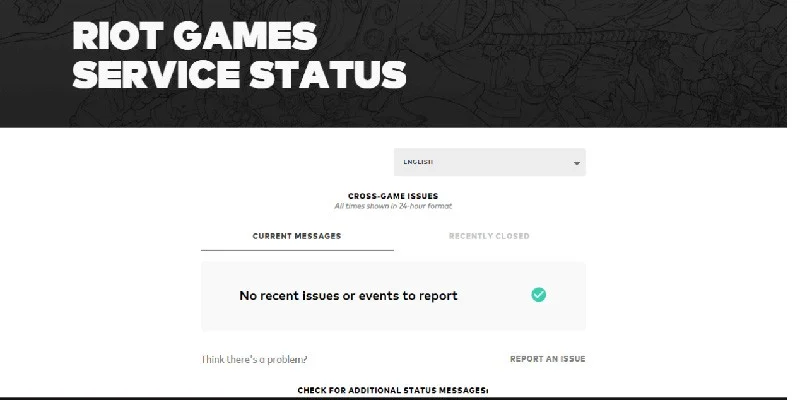
The most authoritative source for server information is Riot's dedicated Service Status page. This real-time monitoring system provides comprehensive data across all global regions and should be your first checkpoint when experiencing connectivity issues.
How to Access and Interpret:
- Navigate directly to the Riot Games Service Status page
- Select your specific region from the dropdown menu
- Examine active incidents, which are categorized by severity and impact
- Review maintenance notifications that may affect gameplay
- Check historical data to identify patterns in server instability
The status page uses color-coded indicators: green represents operational servers, yellow indicates degraded performance, and red signals major outages. Each incident includes detailed timestamps, affected services, and estimated resolution times.
Real-Time Updates Through Official Social Media Channels
Riot maintains active communication channels that provide immediate updates during server disruptions:
@RiotSupport serves as the primary technical support channel, offering real-time status updates, acknowledgment of widespread issues, and estimated resolution timeframes. This account typically responds to server problems within minutes of detection.
@PlayVALORANT functions as the main game communication hub, sharing broader announcements about scheduled maintenance, game updates that might affect server performance, and major regional issues.
Following both accounts ensures comprehensive coverage of server-related communications. Enable notifications for these accounts to receive instant alerts during critical outages.
Community-Driven Monitoring Platforms
Third-party monitoring services aggregate user reports to provide broader perspectives on server health:
DownDetector collects real-time user reports and creates visual outage maps showing geographic distribution of problems. The platform displays complaint volume over time, helping distinguish between isolated incidents and widespread outages. Review the heat map feature to determine if issues are regional or global.
Down for Everyone or Just Me provides quick verification of whether connectivity problems are widespread or specific to your connection. This tool is particularly useful for rapid diagnosis when you're unsure if the issue originates from Riot's servers or your local network.
These platforms excel at detecting problems before official acknowledgment, as they rely on immediate user reporting rather than internal monitoring systems.
In-Game Status Indicators
Valorant's client provides built-in status information that can reveal server conditions:
Launch the game client and examine the main menu for notification banners or pop-up messages. These alerts typically appear as yellow or red bars at the top of the interface, containing information about ongoing maintenance, known issues, or degraded performance.
The client also displays connection quality indicators during gameplay. Access the network performance graph using CTRL + F to view real-time ping, packet loss, and server response metrics.
Understanding and Diagnosing Server-Related Issues
Determining Current Server Status
When experiencing connectivity problems, follow this systematic approach:
Step 1: Official Verification
Check the Riot Games Service Status page first, focusing on your specific region. Look for any active incidents that match your symptoms.
Step 2: Community Confirmation
Visit DownDetector to review recent user reports. A sudden spike in complaints typically indicates legitimate server issues rather than individual connectivity problems.
Step 3: Social Media Verification
Monitor @RiotSupport for official acknowledgment of issues. Riot typically confirms widespread problems within 15-30 minutes of detection.
Common Causes of Connection Disruptions
Understanding the root causes of server issues helps determine appropriate responses:
Scheduled Server Maintenance
Riot performs regular maintenance during off-peak hours, typically announced 24-48 hours in advance. These updates temporarily disrupt service but usually last 1-4 hours. Maintenance schedules vary by region to minimize impact on peak playing times.
High Traffic Congestion
Peak gaming hours (evenings and weekends) can overwhelm server capacity, leading to increased queue times, delayed match creation, and higher latency. This typically affects matchmaking servers more than gameplay servers.
Local Network Interference
Problems with your internet service provider, router configuration, or local network infrastructure can mimic server issues. These problems affect only your connection while others remain unaffected.
Distributed Denial of Service (DDoS) Attacks
Malicious attacks targeting Riot's infrastructure can cause widespread outages. These events typically affect multiple regions simultaneously and receive immediate official acknowledgment.
Connection Optimization Strategies
When servers are operational but performance issues persist, implement these proven solutions:
Network Infrastructure Improvements
Switch from Wi-Fi to a wired Ethernet connection to eliminate wireless interference and packet loss. Ethernet connections provide consistent bandwidth and lower latency compared to wireless alternatives.
- Consistent latency and bandwidth
- Eliminates wireless interference
- Reduces packet loss significantly
- More stable during peak usage
- Variable signal strength
- Interference from other devices
- Higher latency due to protocol overhead
- Susceptible to environmental factors
Background Application Management
Close bandwidth-intensive applications including streaming services, file downloads, and cloud synchronization software. These applications compete for network resources and can introduce latency spikes during gameplay.
Gaming-Specific Network Optimization
Consider specialized gaming network optimization tools like LagoFast or GearUP Booster, which can improve routing efficiency and reduce ping through optimized server connections.
Valorant Global Server Infrastructure
Understanding server locations helps optimize connection quality and troubleshoot regional issues:
| Region | Primary Locations | Coverage Area |
|---|---|---|
| North America | East & West Coast USA, Canada | United States, Canada |
| Europe | Germany, Netherlands | European Union, UK |
| Asia | Hong Kong, Singapore, Japan, South Korea | Asia-Pacific Region |
| South America | Brazil | South American Countries |
| Oceania | Australia | Australia, New Zealand |
| Middle East | Bahrain | Middle Eastern Countries |
North America Region
Multiple server clusters distributed across the United States and Canada ensure comprehensive coverage for players in different geographic areas. Primary locations include both East and West Coast facilities to minimize cross-continent routing.
Europe Region
European infrastructure centers in Germany and the Netherlands provide optimal coverage for the continent. These locations offer excellent connectivity to surrounding countries through high-speed fiber networks.
Asia Region
Asian server infrastructure spans Hong Kong, Singapore, Japan, and South Korea, providing comprehensive coverage for the diverse Asia-Pacific gaming community. Each location is strategically positioned to serve specific sub-regions effectively.
South America Region
Brazilian servers and surrounding infrastructure serve the South American gaming community. This regional approach ensures players don't experience transcontinental routing delays.
Oceania Region
Australian server infrastructure serves the Oceania region from major metropolitan areas, providing optimal connectivity for players across Australia and nearby territories.
Middle East Region
Bahrain and nearby regional servers provide dedicated infrastructure for Middle Eastern players, reducing the need for connections to distant European or Asian servers.
Selecting the geographically closest server typically provides the lowest latency and most stable connection. However, server load and routing efficiency can sometimes make a slightly more distant server perform better than the nearest option.
Advanced Tools and Performance Resources
Valorant Tracker provides comprehensive performance analytics, match history, and detailed statistics that can help identify patterns in connection-related performance issues. Use this platform to correlate server problems with gameplay performance over time.
Overwolf Applications offer a platform hosting various Valorant-related tools for performance monitoring, gameplay analysis, and system optimization. These applications can provide additional insights into connection quality and server performance.
These resources complement server status monitoring by providing data-driven insights into how server issues affect actual gameplay performance.
Connection Enhancement Strategies
Effective Network Optimization Techniques
Wired Connection Implementation
Ethernet connections eliminate Wi-Fi interference, reduce packet loss, and provide consistent bandwidth allocation. Wireless connections introduce variables including signal strength fluctuations, interference from other devices, and increased latency due to wireless protocol overhead.
Network Device Reset Procedures
Power cycling your modem and router clears temporary configuration issues, refreshes DHCP leases, and eliminates accumulated connection errors. Perform this process by unplugging devices for 30 seconds before reconnecting.
Network Driver Maintenance
Maintain current network adapter drivers to ensure optimal compatibility with your hardware and eliminate known bugs that can affect gaming performance. Check manufacturer websites quarterly for driver updates.
DNS Server Optimization
Configure your system to use high-performance DNS servers like Google's (8.8.8.8) or Cloudflare's (1.1.1.1) for faster domain name resolution. While this doesn't directly affect gameplay latency, it can improve connection establishment times.
Quality of Service (QoS) Configuration
Configure your router to prioritize gaming traffic, ensuring Valorant receives necessary bandwidth even when other devices consume network resources. Most modern routers include gaming-specific QoS presets.
Network Buffering Optimization
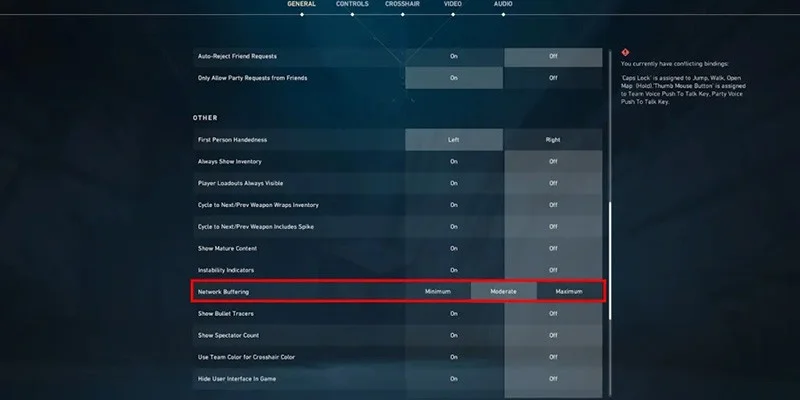
Enable Valorant's network buffering settings to help manage packet loss through intelligent data buffering. This setting compensates for minor network inconsistencies without significantly increasing latency.
Common Misconceptions to Avoid
VPN Usage for Latency Reduction
Using VPNs typically increases latency by introducing additional routing steps and encryption overhead. VPN connections can also violate Riot's terms of service and may result in account restrictions.
IPv6 Disabling
Disabling IPv6 rarely affects gaming performance unless your ISP specifically uses IPv6 for gaming traffic. Most gaming connections still use IPv4, making this change ineffective for most users.
Game Reinstallation for Network Issues
Connectivity problems stem from network configuration or server issues, not corrupted game files. Reinstalling Valorant won't resolve network-related problems and wastes significant time.
Excessive Background Application Closure
While some applications consume bandwidth, closing all background processes can disable important system functions without meaningful performance gains. Focus on bandwidth-intensive applications rather than all running processes.
DNS Changes for Latency Improvement
DNS servers affect domain name resolution speed, not real-time gameplay latency. Changing DNS providers won't reduce your ping during matches, though it may slightly improve connection establishment times.
Expert Troubleshooting: Advanced Problem Resolution
Diagnosing Complex Connection Issues
Partial Service Availability
When you can log in but cannot queue for matches, Riot's authentication servers are operational while matchmaking infrastructure experiences problems. This "ghost lobby" situation typically affects specific server clusters and usually receives rapid attention from Riot's technical team.
Regional Connection Disparities
If friends in your area can connect while you cannot, the issue likely involves ISP-specific routing or regional server synchronization problems. Different internet service providers route traffic through various pathways, potentially affecting only certain provider networks.
Network Performance Analysis
Use Valorant's built-in network graph (CTRL + F) to distinguish between local and server-side issues:
- Sudden ping spikes typically indicate local network problems
- Consistent latency across multiple players suggests server-side issues
- High packet loss can originate from either source but requires different solutions
Game-Specific Connection Optimization
Valorant Routing Differences
Valorant uses custom server infrastructure optimized for competitive gaming, which may route differently than other games. Some internet service providers may have suboptimal pathways to Riot's servers, even when those servers appear geographically close.
Performance Optimization Tools
Specialized gaming network optimization services like ExitLag or WTFast can improve routing efficiency by finding optimal pathways to Riot's servers. These services work by testing multiple routes and selecting the most efficient connection path.
Ranking Impact and Server Performance
Riot's Protection Systems
Riot has implemented systems to detect widespread server instability that might unfairly affect competitive matches. When severe server-side lag is detected across multiple matches, those games may not count toward ranking calculations.
Minor Issue Handling
Small connectivity issues that don't affect large numbers of players typically won't trigger rank protection systems. Players remain responsible for their connection quality, even during minor server performance degradation.
Understanding these systems helps set appropriate expectations about when server issues might affect your competitive progression versus when connection responsibility remains with individual players.
This comprehensive approach to monitoring and optimizing your Valorant connection ensures you're always playing at peak performance, maximizing your competitive potential while minimizing frustration from avoidable connectivity issues.