

Midnight brings a completely redesigned nameplate system to World of Warcraft. This guide covers everything you need to know about the new nameplates, from basic customization to addon solutions that help fill the gaps left by Blizzard's default setup.
What's Changing with Nameplates
Midnight delivers one of the biggest nameplate overhauls in WoW's history. This goes beyond a visual refresh. Blizzard has fundamentally restructured how nameplates work and what you can do with them.
The Visual Overhaul
Nameplates look dramatically different now. Blizzard went for a cleaner, more modern aesthetic with multiple style options to choose from. The new design prioritizes readability and visual clarity over the older, more utilitarian look.
New Information on Display
The revamped nameplates now show information that previously required addons:
Mob Rarity Indicators: You can now see at a glance if a creature is a standard mob, rare, elite, or boss. This shows directly on the nameplate without any addon.
Health Information: The new system gives you detailed health displays including both percentage values and actual health totals. You can configure exactly how much health info you want visible.
Cast Bar Improvements: Nameplates now include better cast bar functionality with glow effects that highlight important spells. Casts targeting you specifically get distinct visual treatment, making it easier to spot when you're being attacked.
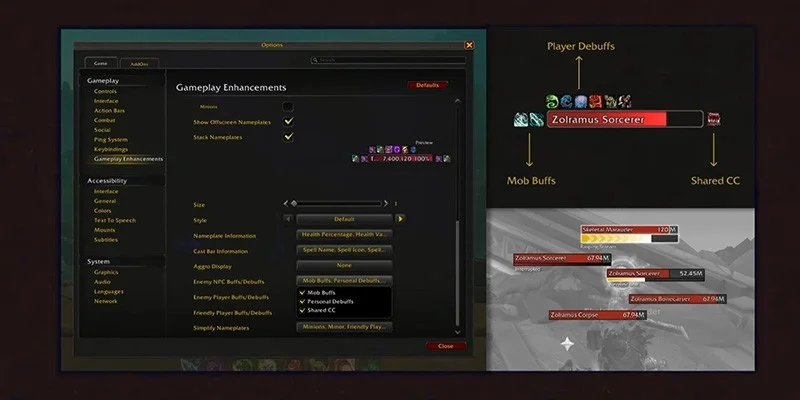
Combat Buff and Debuff Tracking: Relevant combat buffs and debuffs now appear on nameplates by default, letting you track status effects on enemies without external tools.
Crowd Control Field: A new dedicated section shows crowd control effects like stuns, interrupts, and other control abilities.
Aggro Display Options: Tanks and others concerned with threat management now have built in aggro indicators available for all roles directly through the nameplate settings.
Full Feature Breakdown
Knowing exactly what the new nameplate system can and can't do is critical for planning your UI setup in Midnight.
What's Included
These capabilities come with the default Midnight nameplate system:
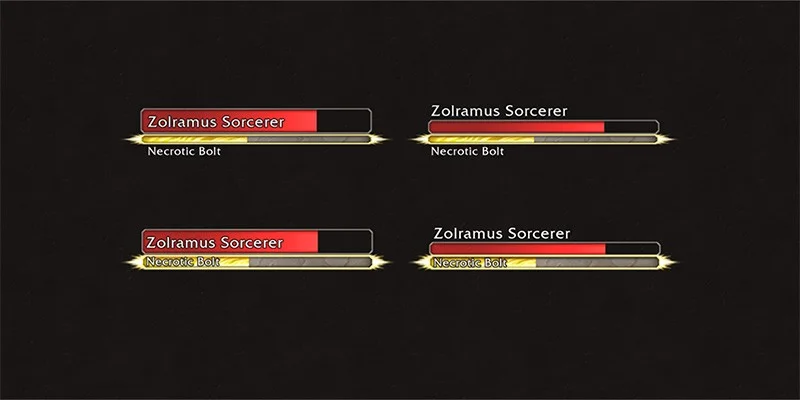
Six Nameplate Styles: You can pick from Modern, Thin Bars, Blocky Bars, Clean Health, Blocky Cast, and Legacy Red. Each gives you a different visual approach to displaying health bars, cast bars, and text positioning.
Scaling Controls: General size settings let you adjust the overall size of nameplates to suit your preferences and screen resolution.
Buff and Debuff Scale Adjustment: A sliding scale from 70% to 140% lets you fine tune how large buff and debuff icons appear on nameplates.
Health Display Options: You can toggle health percentages, actual health values, and rarity icons independently.
Detailed Cast Bar Information: Cast bars can display the spell name, spell icon, spell target, and visual highlights for important casts or casts targeting you.
Role Specific Aggro Display: Three aggro display modes are available (Progressive, Flash, and Health Bar Color) suited to different playstyles and roles.
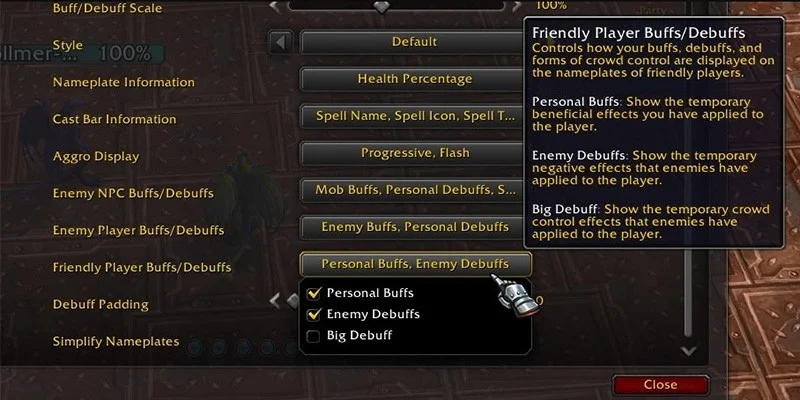
Buff/Debuff Filtering by Target Type: Different buff and debuff display options exist for Enemy NPCs (Mob Buffs, Personal Debuffs, Shared CC), Enemy Players (Enemy Buffs, Personal Debuffs, Big Debuff), and Friendly Players (Player Buffs, Enemy Debuffs, Big Debuff).
Debuff Padding Control: A sliding bar from 0 to 50 lets you adjust spacing between debuff icons.
Nameplate Simplification Options: You can simplify nameplates for Minions, Minor enemies, Friendly Players, and Friendly NPCs to reduce visual clutter.
What's Missing
Several features that players expect from nameplate addons aren't present in the default system:
Text Position Customization: Text elements can't be freely moved around the nameplate. Position options are limited to what each of the six styles gives you.
Custom Font Options: You can't change the font used in nameplates. The default font is your only option without addons.
Color Customization: Health bar and cast bar colors can't be freely customized through default settings. Blizzard added the ability to color health bars differently based on enemy type (boss, miniboss, caster, melee, trivial mob), but individual mob coloring isn't possible. Cast bars only change color based on whether the cast is interruptible or if it's a channeled ability versus a standard cast.
Buff and Debuff Position Control: The locations where buff and debuff icons appear on nameplates can't be adjusted. They appear in fixed positions regardless of your preference.
Target Display Options: No built in options exist for customizing how nameplates appear when targeting specific NPCs or mobs.
Name Customization: Enemy names can't be shortened, reformatted, or otherwise customized. Blizzard's default name display will often truncate longer names, which can make identifying specific enemies harder, especially in encounters with multiple adds that have similar names.
Filtering Capabilities: This is the most significant limitation. You can't filter out specific buffs, debuffs, or status effects from appearing on nameplates.
Why Filtering Matters
The inability to filter nameplate information is the most impactful limitation of the new system. To understand why this matters, look at how experienced players typically set up their UI.
The Information Overload Problem
In challenging content like Mythic+ dungeons or raids, nameplates can quickly become cluttered with information that isn't actionable or relevant to your role.
Affliction Warlock with Absolute Corruption
When playing an Affliction Warlock with the Absolute Corruption talent, your Corruption DoT becomes permanent on targets. In a Mythic+ dungeon pack with 15 enemies, this means 15 Corruption icons appear on nameplates. These icons give you zero useful information since the effect never expires and requires no maintenance. Without filtering, these icons eat up visual space and add to your mental processing load without giving you anything useful.
Raid Wide Damage Auras
Many raid bosses apply persistent damage auras that tick for a percentage of player health throughout the entire encounter. These often display as debuffs on player nameplates. Seeing this debuff active on 20 raid members for an entire fight gives you no actionable information. Everyone knows the damage is happening. Yet it clutters the visual space and makes spotting important debuffs harder.
Soak Mechanic Debuffs
Raid encounters frequently use soak mechanics where groups take turns absorbing damage. Participants receive a debuff preventing them from soaking again for a period. In coordinated groups where soak assignments are predetermined, seeing "I just soaked" debuffs on players for 45 seconds gives you no value but still appears on nameplates.
The Traditional Solution
Experienced players, particularly healers, have traditionally addressed this by filtering out information they don't need. Learning a new raid encounter involves identifying which debuffs require immediate attention and which are just background noise. Players would then configure their nameplate addons to hide the noise while prominently displaying critical information.
This filtering capability is exactly what the Midnight nameplate system lacks, and it represents the biggest adjustment you'll need to make.
Accessing Nameplate Settings
Configuring your nameplates in Midnight is straightforward once you know where to look.
Navigation Path
To access nameplate customization:
- Press the Escape key to open the game menu
- Select "Options"
- Navigate to the "Nameplates" section
All nameplate customization settings are in this single menu location.
The Six Nameplate Styles
Midnight gives you six distinct visual styles for nameplates. Each style changes not just the appearance of health and cast bars but also affects where text elements appear on the nameplate.
Modern Style
Modern represents Blizzard's vision for contemporary nameplate design. It features clean lines and a balanced layout suitable for most players transitioning from the old system.
Thin Bars Style
This style uses narrower health and cast bars, reducing the vertical footprint of nameplates on screen. This can work well if you find standard nameplates too visually dominant.
Blocky Bars Style
This style uses a more segmented, block based appearance for the health and cast bars. The geometric design creates clear visual boundaries between different health segments.
Clean Health Style
Focused on health display clarity, this style minimizes decorative elements to prioritize health information readability. It's a good fit if you primarily use nameplates for health tracking.
Blocky Cast Style
Similar to Blocky Bars but with particular emphasis on cast bar presentation. If you prioritize tracking enemy casts, you might find this style's cast bar treatment easier to read.
Legacy Red Style
This style maintains visual continuity with WoW's older nameplate aesthetic. If you prefer a more traditional look or find the newer styles too different from what you're used to, this option is worth trying.
Visual Indicators for Important Casts
One significant addition in the Midnight nameplate system is visual highlighting for dangerous casts.
Important Cast Highlighting
When an enemy begins casting a spell flagged as important by the game, the cast bar displays with a bright glow effect around it. This visual cue helps you quickly identify casts that may require interruption or other responses.
Targeted Cast Highlighting
When an enemy casts a spell specifically targeting you, the cast bar displays with a distinct red border surrounding it. This makes it immediately apparent when you personally need to respond to an incoming ability. You might need to use a defensive cooldown, move out of range, or prepare to interrupt.
Nameplate Addon Options
The default nameplates give you more functionality than ever before, but addon options exist if you're looking for additional customization.
Plater Nameplates
Plater remains one of the most popular nameplate addons and is receiving updates for Midnight compatibility. The addon gives you extensive customization options well beyond what the default settings allow.
Profiles from Wago.io: Plater profiles can be imported from Wago.io, letting you quickly adopt configurations created by other players without manually adjusting every setting.
Compatibility Note: Not all existing Plater profiles will work correctly with Midnight. Look for profiles specifically designed or updated for the Midnight expansion.
You can download Plater through CurseForge.
Platynator
Platynator is a newer addon option designed specifically with Midnight's addon constraints in mind. Unlike Plater, which has been adapted from previous expansions, Platynator was built from scratch to work within the limitations imposed by the Midnight client.
Simplified Customization: The addon gives you straightforward customization that works reliably within Midnight's restrictions. If you want something different from the default nameplates but don't need Plater's extensive complexity, Platynator sits in a nice middle ground.
Design Focus: Platynator aims to give you a clean, fresh look that builds on the new nameplate styles rather than completely replacing them.
You can download Platynator through CurseForge.
What Addons Can and Can't Do
Even with addon support, certain limitations remain in the Midnight nameplate system. Addons can improve visual presentation, add some customization for colors and positioning, and improve the overall look of nameplates.
Addons can't fully circumvent the filtering restrictions, though. The core ability to parse spell IDs for filtering purposes has been restricted, which limits how much addons can do to address the information overload problem. Some workarounds exist, but don't expect addons to fully replicate the filtering capabilities available in previous expansions.
The Broader UI Context
Nameplates are part of a larger UI overhaul in Midnight. Understanding the broader context helps explain why certain limitations exist.
The Addon Restrictions
Blizzard has intentionally restricted addon functionality in Midnight, and nameplates are just one affected area. WeakAuras, ElvUI, and other popular UI addons face limitations on what they can access and modify.
The reasoning behind these restrictions relates to Blizzard's encounter design philosophy. Powerful addons had created an "arms race" between addon developers and encounter designers, with addons solving encounter mechanics in ways that trivialized intended difficulty. By restricting what addons can access, Blizzard aims to create a more level playing field and reduce dependency on specific addon configurations for competitive play.
The Filtering Dilemma
The filtering limitation exists specifically because enabling filtering would require allowing addons to parse Blizzard's API for spell IDs. While this would enable helpful filtering (like hiding your permanent Corruption icons), it would also enable the creation of WeakAuras and similar tools that Blizzard specifically wants to restrict. These tools could track enemy cooldowns, predict incoming mechanics, or solve complex raid encounters automatically.
This creates a situation where quality of life improvements for players become collateral damage in the effort to prevent addons that trivialize encounters.
Potential Future Changes
Blizzard may find ways to allow some filtering functionality in future patches, particularly for "hiding" information rather than "showing" additional information. The logic here is that not displaying certain debuffs shouldn't give competitive advantages the way displaying additional tracked information might.
Whether such changes will come remains uncertain. Prepare for the possibility that the current limitations will persist throughout the expansion.
Recommended Settings for Different Roles
Based on the available options, here are suggested starting configurations for different player roles.
DPS Players
For most DPS players, nameplate information needs are relatively straightforward:
Style Recommendation: Modern or Thin Bars styles work well for most DPS players. They give you clear enemy identification without excessive visual weight.
Health Display: Enable health percentages for execute phase awareness. Health values are optional based on personal preference.
Cast Bar Settings: Enable all cast bar options including spell name, icon, and both highlight settings. Quickly identifying interruptible casts is valuable for all DPS players.
Aggro Display: Even as DPS, enabling aggro display can help you notice when you've pulled threat, letting you react before the tank notices.
Buff/Debuff Display: For Enemy NPCs, enable Mob Buffs (to see purgeable effects) and Personal Debuffs (to track your DoTs).
Tank Players
Tanks have the most nameplate intensive role and benefit from seeing as much information as possible:
Style Recommendation: Modern or Blocky Bars give you good visual weight appropriate for the primary target management role.
Health Display: Enable both percentage and value displays. Tanks often need to make decisions based on specific health thresholds.
Cast Bar Settings: Enable all options. Tanks frequently handle interrupts and need to identify dangerous casts targeting any party member.
Aggro Display: Critical. Choose Progressive or Health Bar Color based on preference. Both clearly communicate threat status.
Buff/Debuff Display: Enable Mob Buffs for purge coordination and Shared CC to track crowd control application.
Healer Players
Healers face the most challenging nameplate situation in Midnight because they need to track information on both enemy and friendly nameplates:
Style Recommendation: Thin Bars or Clean Health to minimize nameplate footprint, since healers need to see both enemy nameplates and party/raid frames at the same time.
Enemy Nameplate Settings: Focus on cast bars with all highlight options enabled. Healers need to see dangerous casts that may require healing responses or dispels.
Friendly Nameplate Approach: The lack of filtering hits healers the hardest. Consider using raid frames as your primary party health tracking and minimizing reliance on friendly nameplates where possible.
Debuff Padding: Increase debuff padding to maximum (50) to help separate individual debuff icons and improve readability. This partially compensates for the inability to filter.
Transitioning from Previous Setups
Players who had heavily customized nameplate configurations in previous expansions face the biggest adjustment period.
Accept Reduced Functionality
The first step is accepting that a direct conversion from your previous setup isn't possible. Features that relied on restricted API access simply can't be replicated.
Prioritize Critical Information
With limited customization available, focus on making sure the most critical information for your role is visible and easy to read. Less important information may need to remain cluttered on screen.
Experiment with Styles
Each of the six nameplate styles positions information differently. Even if your preferred configuration isn't possible, one of the styles may work better for your specific needs than others.
Consider Addon Help
If the default options don't meet your needs, check out Plater or Platynator as potential improvements. While they can't solve every problem, they may give you enough additional customization to create a workable setup.
Give Yourself Time
Any significant UI change requires adaptation. Expect that content will feel more difficult initially, not because it's actually harder but because you're processing information less efficiently. This improves with practice.
Summary
The Midnight nameplate system represents a major change from previous expansions. Blizzard has added many features that previously required addons, but the restrictions on filtering and customization mean players accustomed to highly customized nameplate setups will need to adapt.
The default system now includes six visual styles, health and cast bar options, aggro display, and buff/debuff tracking. Color customization, text positioning, font changes, and most importantly, filtering remain restricted or unavailable.
Addon options like Plater and Platynator can help bridge some gaps, but set realistic expectations about what these tools can accomplish within Midnight's restrictions.
For most players, the transition will involve accepting more visual clutter than before while using the built in options to get the most out of what's available. With time and adjustment, the new system can work well even if it never quite matches the customization possible in previous expansions.